
iPusnas
UI/UX Redesign Case Study
Mobile App Redesign

iPusnas
UI/UX Redesign Case Study
Mobile App Redesign
iPusnas
UI/UX Redesign Case Study
Mobile App Redesign
WHAT IS iPusnas?
WHAT IS iPusnas?
WHAT IS iPusnas?
The iPusnas application is a digital library application that can be used to read e-books and is equipped with social media features, so that users of the iPusnas application can make reviews and provide recommendations to social friends.
The iPusnas application is a digital library application that can be used to read e-books and is equipped with social media features, so that users of the iPusnas application can make reviews and provide recommendations to social friends.
The iPusnas application is a digital library application that can be used to read e-books and is equipped with social media features, so that users of the iPusnas application can make reviews and provide recommendations to social friends.
WHY THIS REDESIGN
WHY THIS REDESIGN
WHY THIS REDESIGN
The first time I downloaded iPusnas was when I visited the national library. I felt this was a good app because it could be used to borrow books online from the collection at the national library but I realized that there were several things that could be improved about this app design. Therefore, I decided to do deeper research and make it into a case study.
The first time I downloaded iPusnas was when I visited the national library. I felt this was a good app because it could be used to borrow books online from the collection at the national library but I realized that there were several things that could be improved about this app design. Therefore, I decided to do deeper research and make it into a case study.
The first time I downloaded iPusnas was when I visited the national library. I felt this was a good app because it could be used to borrow books online from the collection at the national library but I realized that there were several things that could be improved about this app design. Therefore, I decided to do deeper research and make it into a case study.
Goals and Motivation for the redesign:
Goals for the redesign:
Design the solution in wireframe, mockup, prototype
Conduct user testing app using Maze.co
My personal goals:
Create persona and structural design solutions
Design the solution in wireframe, mockup, prototype
Conduct user testing app using Maze.co
Goals and Motivation for the redesign:
Goals for the redesign:
Design the solution in wireframe, mockup, prototype
Conduct user testing app using Maze.co
My personal goals:
Create persona and structural design solutions
Design the solution in wireframe, mockup, prototype
Conduct user testing app using Maze.co
Goals and Motivation for the redesign:
Goals for the redesign:
Design the solution in wireframe, mockup, prototype
Conduct user testing app using Maze.co
My personal goals:
Create persona and structural design solutions
Design the solution in wireframe, mockup, prototype
Conduct user testing app using Maze.co
WIREFRAMES AND MOCKUP FLOW
WIREFRAMES AND MOCKUP FLOW
WIREFRAMES AND MOCKUP FLOW
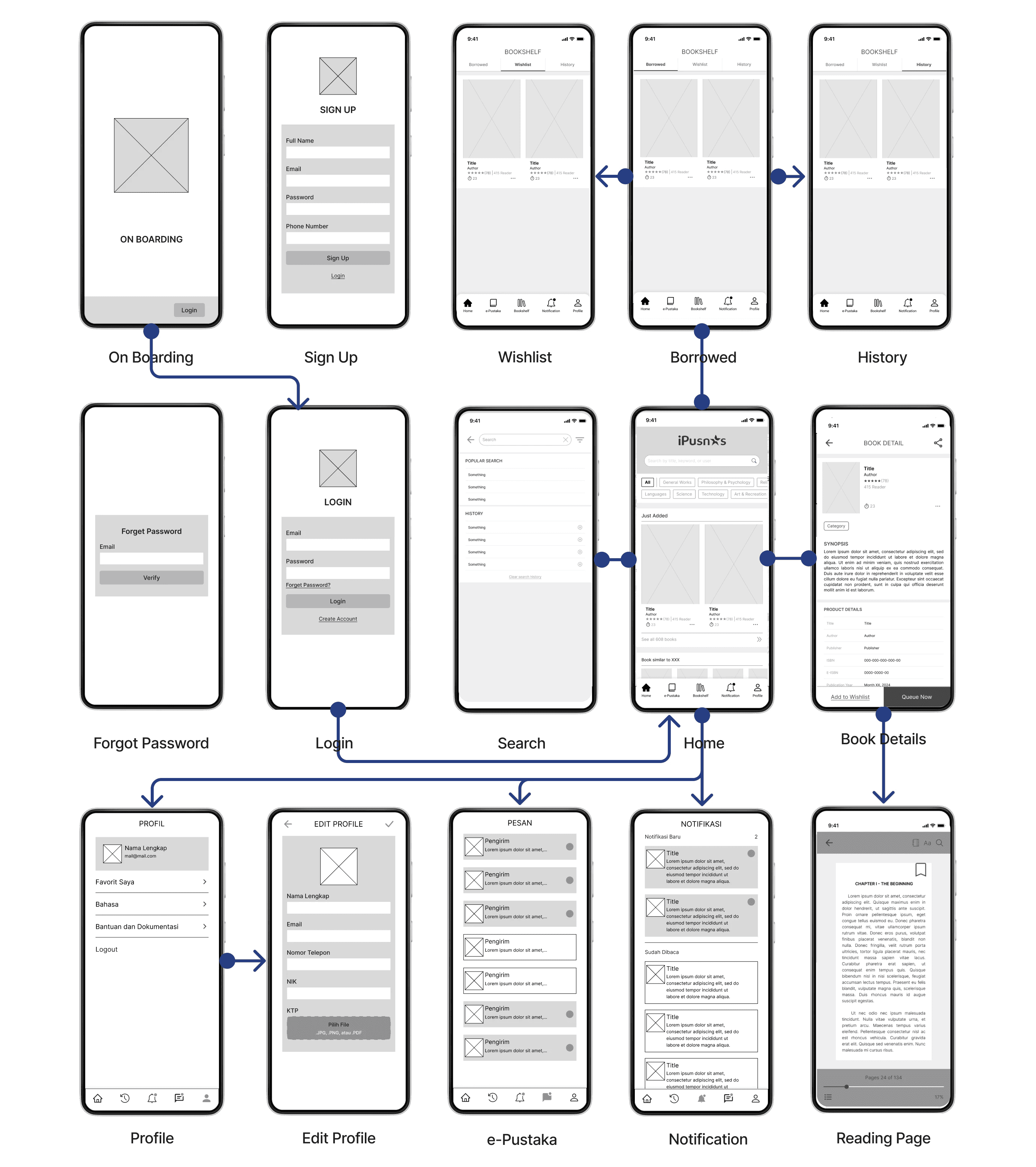
I started by identifying UI designs from iPusnas, its competitors, and other applications. I started making a wireframe with paper and pen first because it was easier to change if there were other ideas during the brainstorming process.
I started by identifying UI designs from iPusnas, its competitors, and other applications. I started making a wireframe with paper and pen first because it was easier to change if there were other ideas during the brainstorming process.
I started by identifying UI designs from iPusnas, its competitors, and other applications. I started making a wireframe with paper and pen first because it was easier to change if there were other ideas during the brainstorming process.
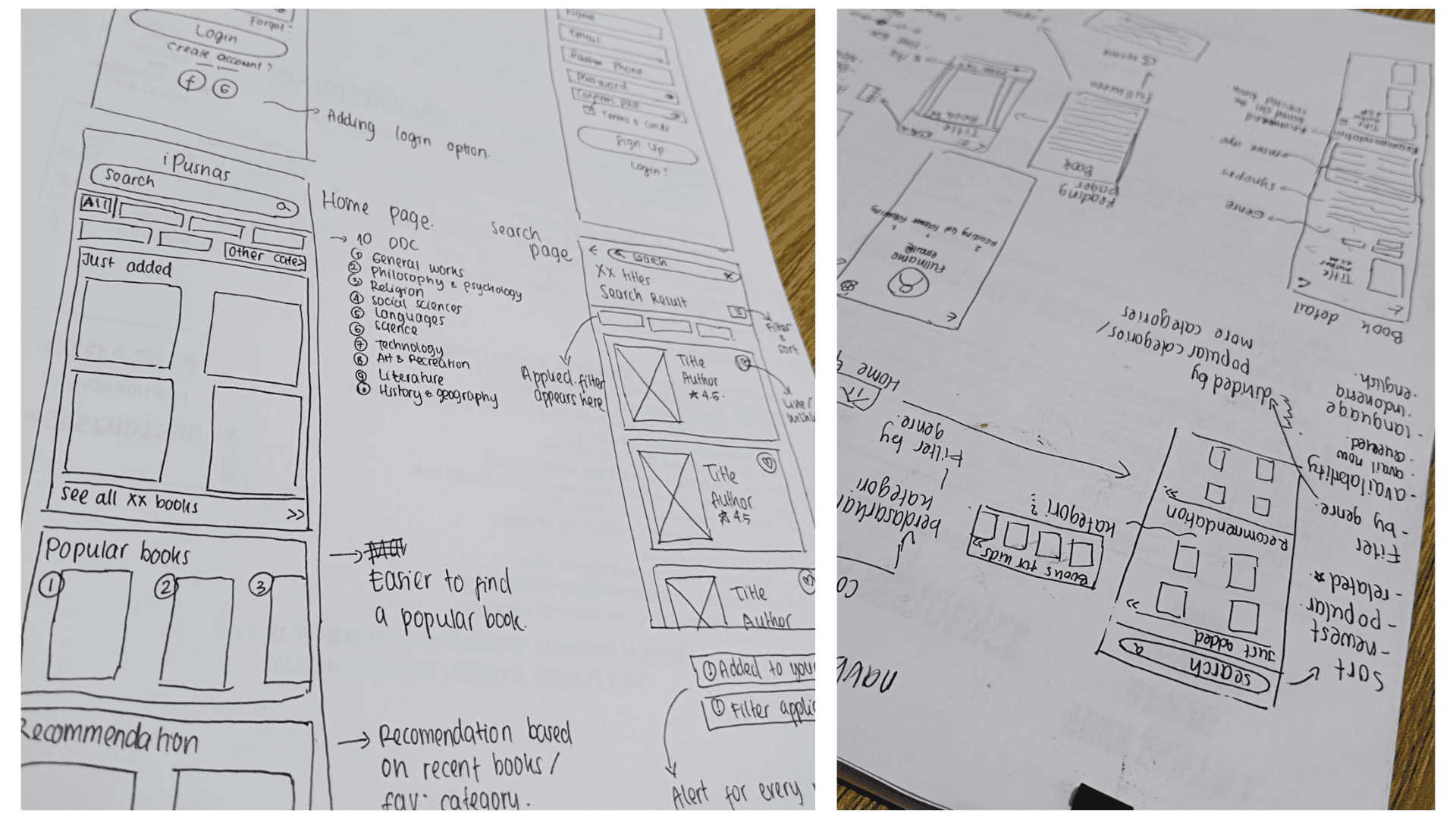
After the brainstorming process I started to create wireframe and mockup flow using Figma.
After the brainstorming process I started to create wireframe and mockup flow using Figma.
After the brainstorming process I started to create wireframe and mockup flow using Figma.
UX SUGGESTIONS AND THE REDESIGN
UX SUGGESTIONS AND THE REDESIGN
UX SUGGESTIONS AND THE REDESIGN
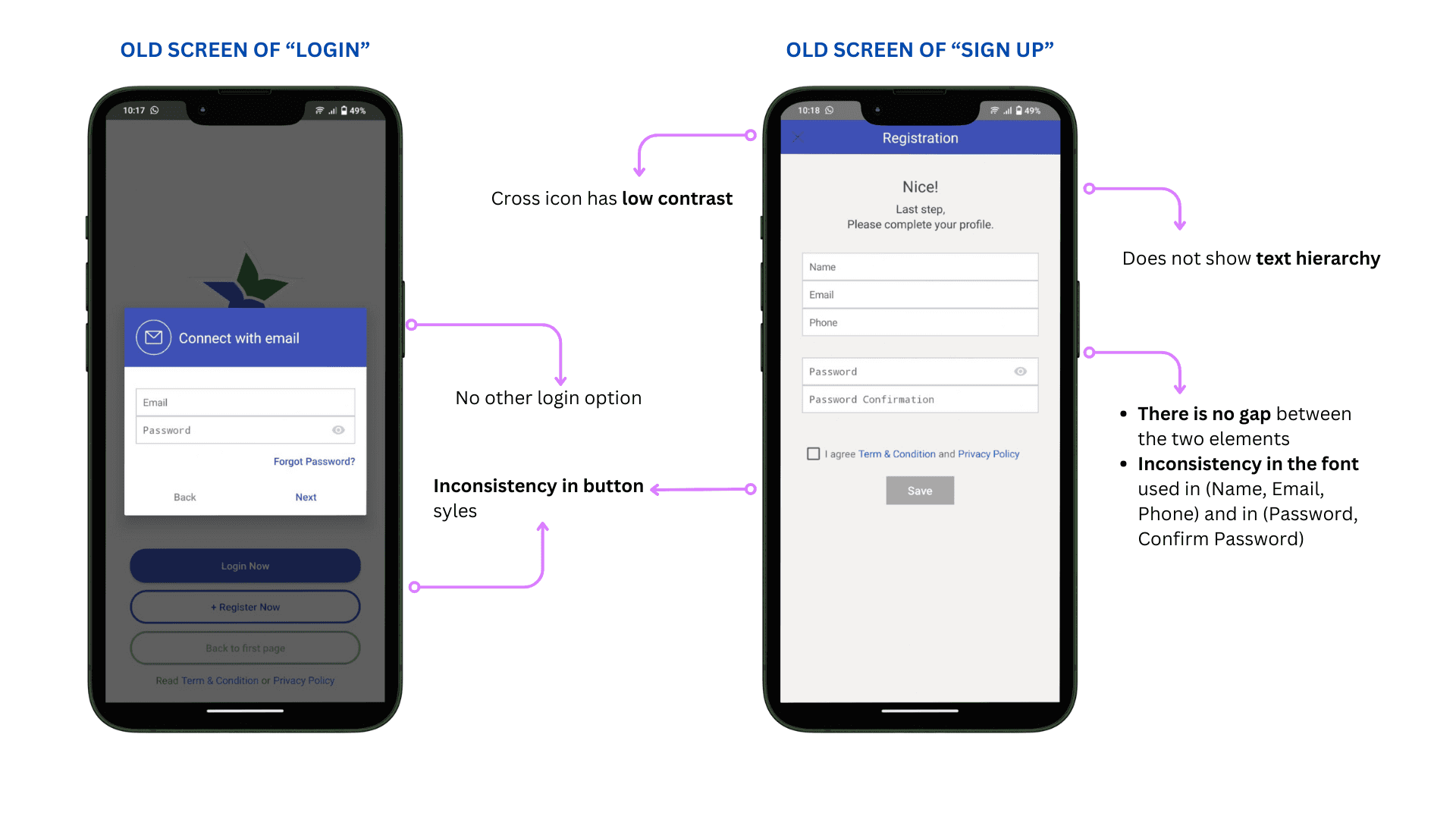
Addressing "Login" and "Sign Up" Screen
Addressing "Login" and "Sign Up" Screen
Addressing "Login" and "Sign Up" Screen
Proposed Solution
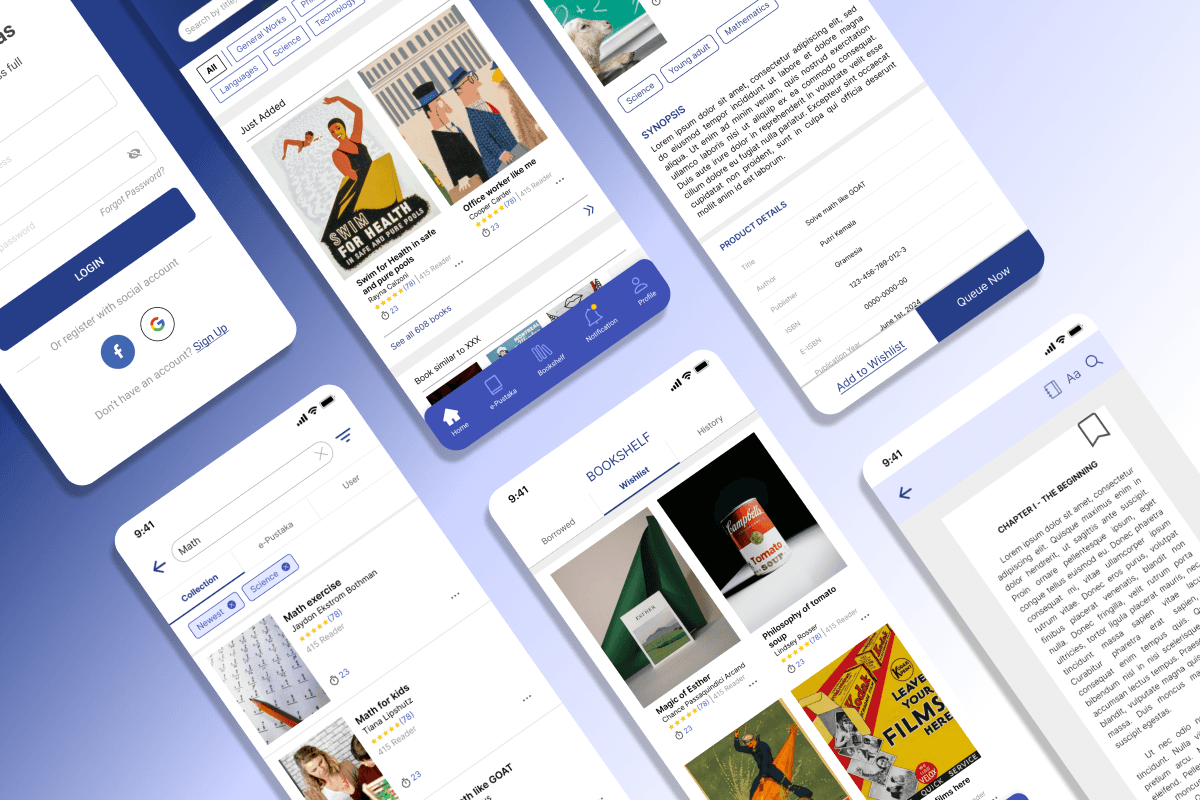
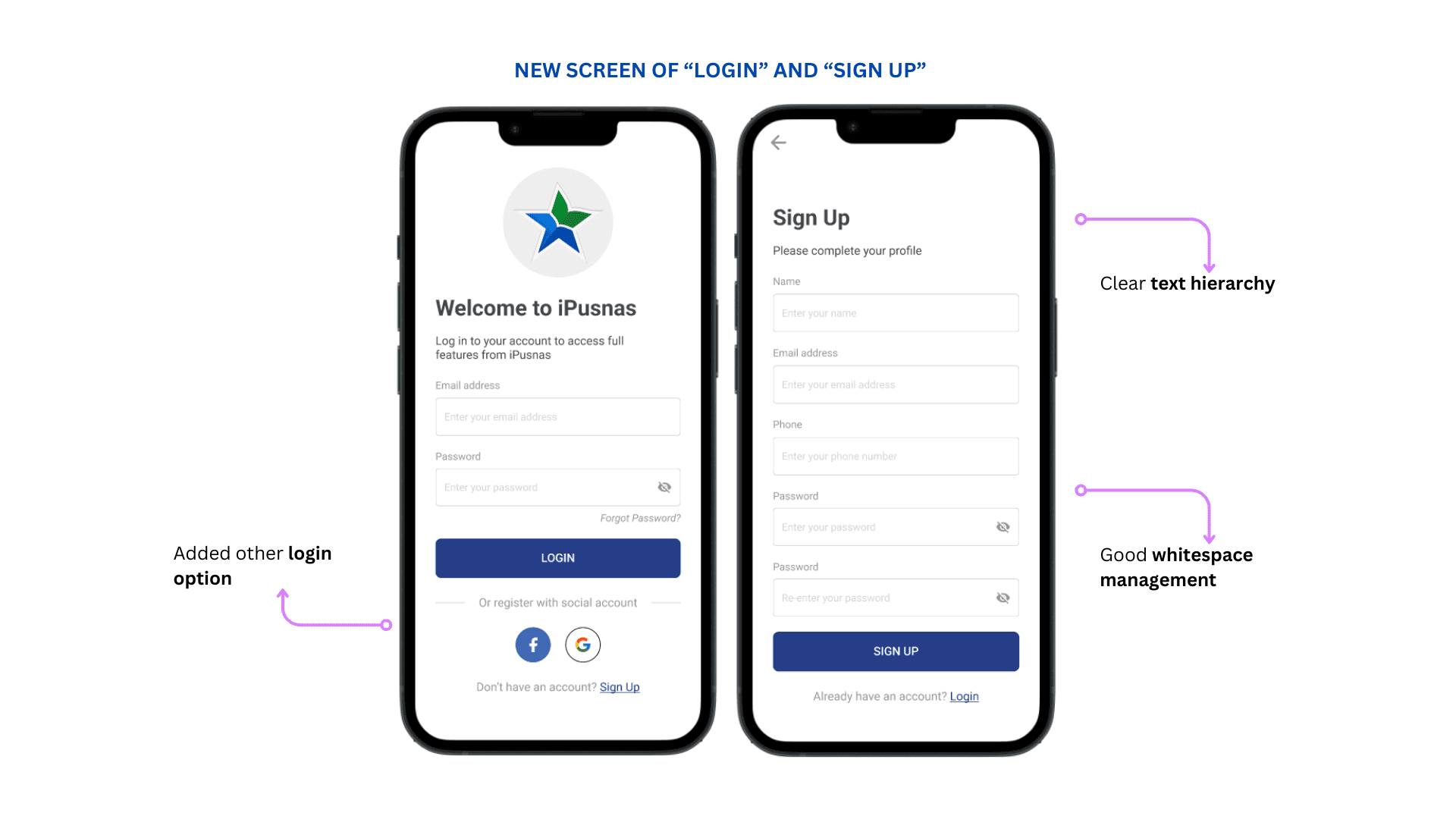
Not much content has been changed on the "Login" and "Sign up" pages; however, I have added options to log in using Facebook and Google. Facebook login has been a feature in the iPusnas app before, so it would be a shame to remove it.
Another improvement I've made is to provide spacing between elements so that whitespace can be managed effectively, and also clarify the text hierarchy at the top of the form.
Proposed Solution
Not much content has been changed on the "Login" and "Sign up" pages; however, I have added options to log in using Facebook and Google. Facebook login has been a feature in the iPusnas app before, so it would be a shame to remove it.
Another improvement I've made is to provide spacing between elements so that whitespace can be managed effectively, and also clarify the text hierarchy at the top of the form.
Proposed Solution
Not much content has been changed on the "Login" and "Sign up" pages; however, I have added options to log in using Facebook and Google. Facebook login has been a feature in the iPusnas app before, so it would be a shame to remove it.
Another improvement I've made is to provide spacing between elements so that whitespace can be managed effectively, and also clarify the text hierarchy at the top of the form.
Addressing "Home" Screen
Addressing "Home" Screen
Addressing "Home" Screen
Proposed Solution
Home - I merged the old "Home" and "Collection" pages and divided them into different sections. The majority of activities shared on the "Home" page involve adding new books, so I moved them to the "Just Added" section.
Navbar - My first concern when redesigning this page was to move the navbar from the top to the bottom. Bottom navbar is easier for users to reach in terms of experience compared to top navbar. I also added descriptions to each icon on the navbar to make it easier for users to know the location of each page.
Books similar to XXX - I added a section that I consider important because this section will display book recommendations based on the user's recent activity. This section will make it easier for users to find books similar to the ones they are currently or recently reading.
Proposed Solution
Home - I merged the old "Home" and "Collection" pages and divided them into different sections. The majority of activities shared on the "Home" page involve adding new books, so I moved them to the "Just Added" section.
Navbar - My first concern when redesigning this page was to move the navbar from the top to the bottom. Bottom navbar is easier for users to reach in terms of experience compared to top navbar. I also added descriptions to each icon on the navbar to make it easier for users to know the location of each page.
Books similar to XXX - I added a section that I consider important because this section will display book recommendations based on the user's recent activity. This section will make it easier for users to find books similar to the ones they are currently or recently reading.
Proposed Solution
Home - I merged the old "Home" and "Collection" pages and divided them into different sections. The majority of activities shared on the "Home" page involve adding new books, so I moved them to the "Just Added" section.
Navbar - My first concern when redesigning this page was to move the navbar from the top to the bottom. Bottom navbar is easier for users to reach in terms of experience compared to top navbar. I also added descriptions to each icon on the navbar to make it easier for users to know the location of each page.
Books similar to XXX - I added a section that I consider important because this section will display book recommendations based on the user's recent activity. This section will make it easier for users to find books similar to the ones they are currently or recently reading.
Addressing "Search" Screen
Addressing "Search" Screen
Addressing "Search" Screen
Proposed Solution
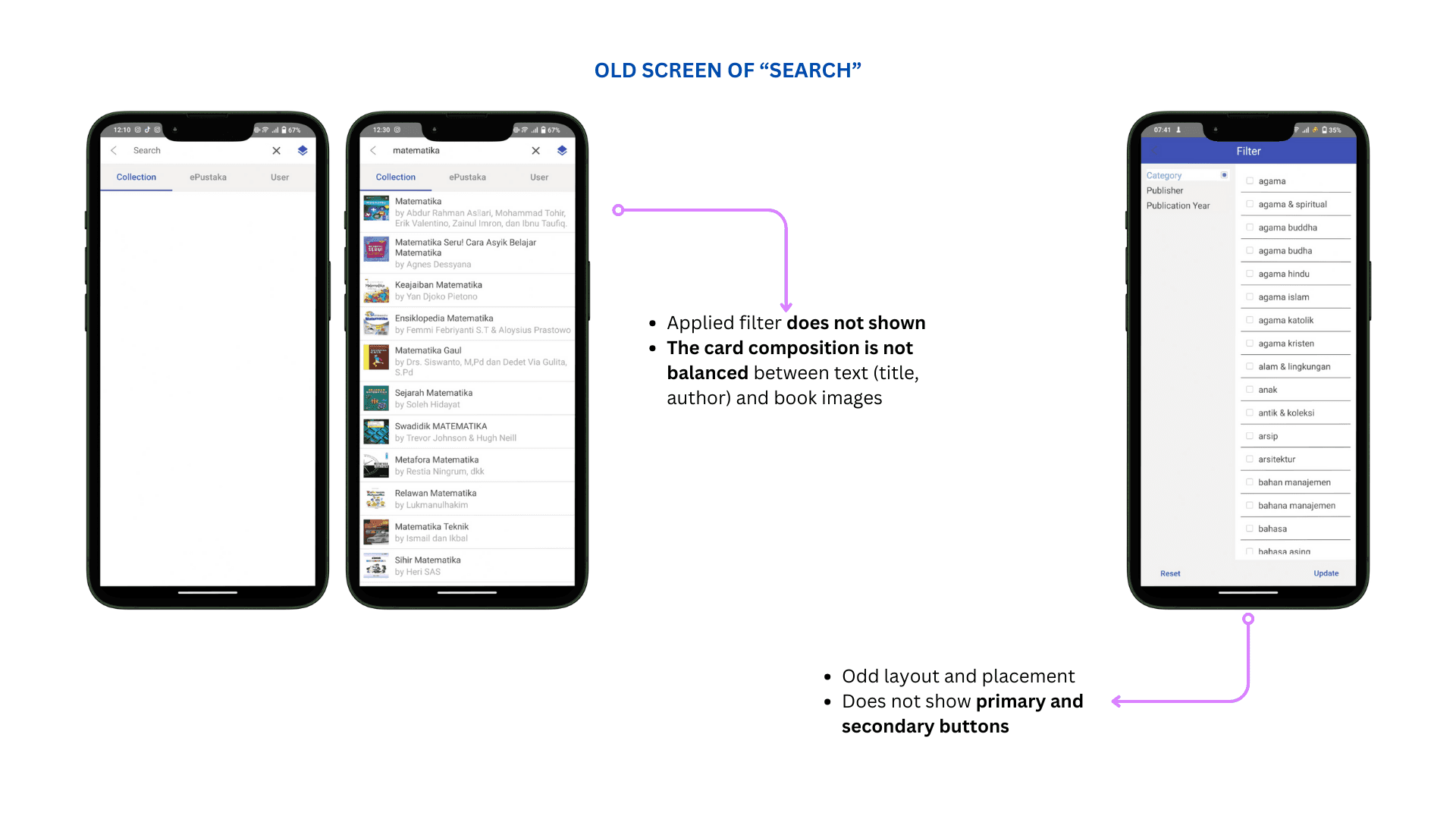
Applied Filters - In the old interface, users wouldn't know which filters were applied. Therefore, I added this feature to make it easier for users.
Filters - Before the redesign, there were only three filters: based on category, publisher, and publication year. I added several common sorts and filters found in library applications like iPusnas. These include sorting by popularity and publication date, availability, language, and category.
Popular Searches and Search History - I added both of these features to the search screen to make it easier for users to know their previous actions or to provide search inspiration based on currently popular searches.
Proposed Solution
Applied Filters - In the old interface, users wouldn't know which filters were applied. Therefore, I added this feature to make it easier for users.
Filters - Before the redesign, there were only three filters: based on category, publisher, and publication year. I added several common sorts and filters found in library applications like iPusnas. These include sorting by popularity and publication date, availability, language, and category.
Popular Searches and Search History - I added both of these features to the search screen to make it easier for users to know their previous actions or to provide search inspiration based on currently popular searches.
Proposed Solution
Applied Filters - In the old interface, users wouldn't know which filters were applied. Therefore, I added this feature to make it easier for users.
Filters - Before the redesign, there were only three filters: based on category, publisher, and publication year. I added several common sorts and filters found in library applications like iPusnas. These include sorting by popularity and publication date, availability, language, and category.
Popular Searches and Search History - I added both of these features to the search screen to make it easier for users to know their previous actions or to provide search inspiration based on currently popular searches.
Addressing "Bookshelf" Screen
Addressing "Bookshelf" Screen
Addressing "Bookshelf" Screen
Proposed Solution
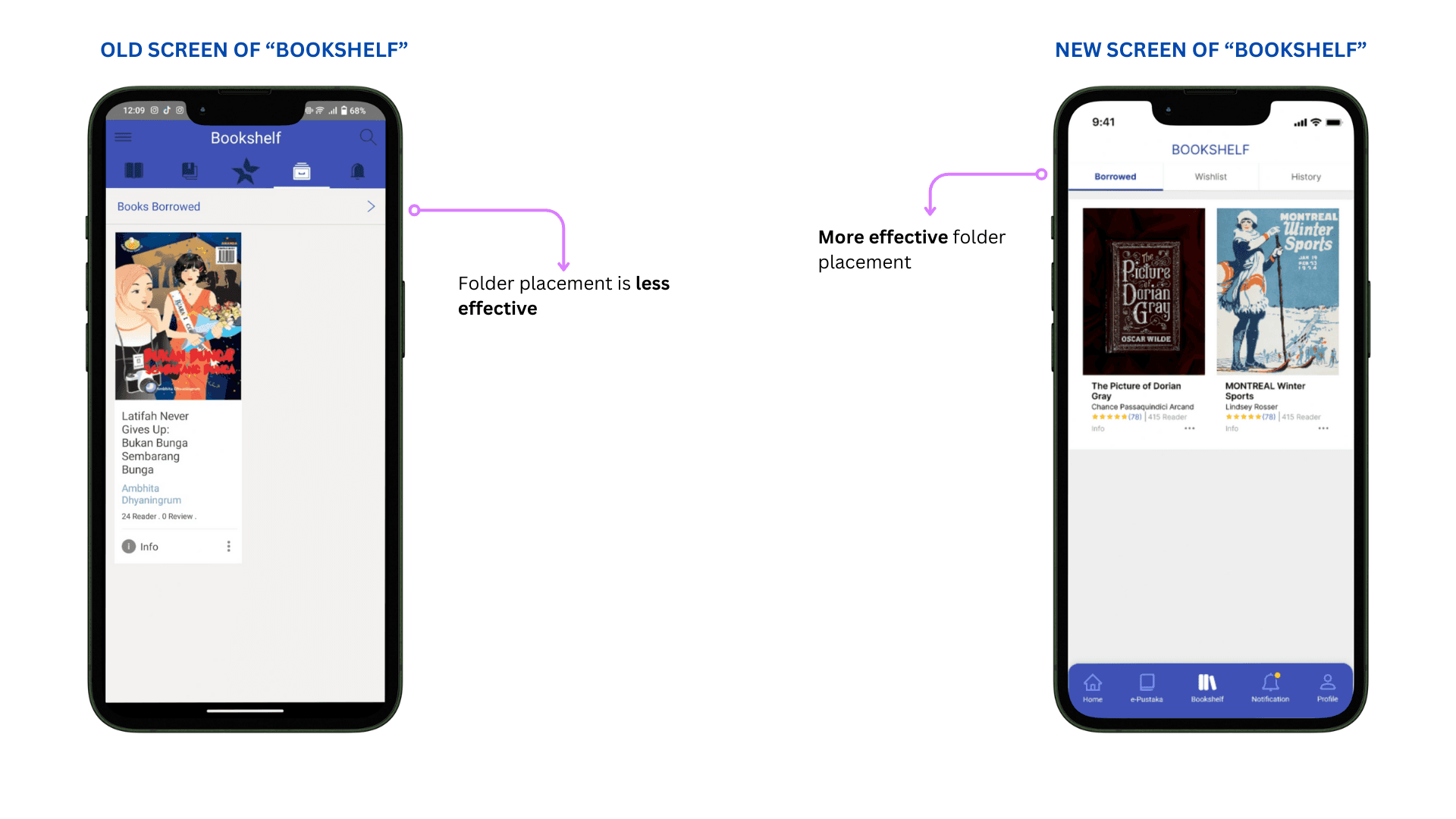
The only thing I changed from the Bookshelf screen is the folder placement layout, navigation tabs will make it easier for users to access the wishlist and history folders.
Proposed Solution
The only thing I changed from the Bookshelf screen is the folder placement layout, navigation tabs will make it easier for users to access the wishlist and history folders.
Proposed Solution
The only thing I changed from the Bookshelf screen is the folder placement layout, navigation tabs will make it easier for users to access the wishlist and history folders.
Addressing "Book Detail" Screen
Addressing "Book Detail" Screen
Addressing "Book Detail" Screen
Proposed Solution
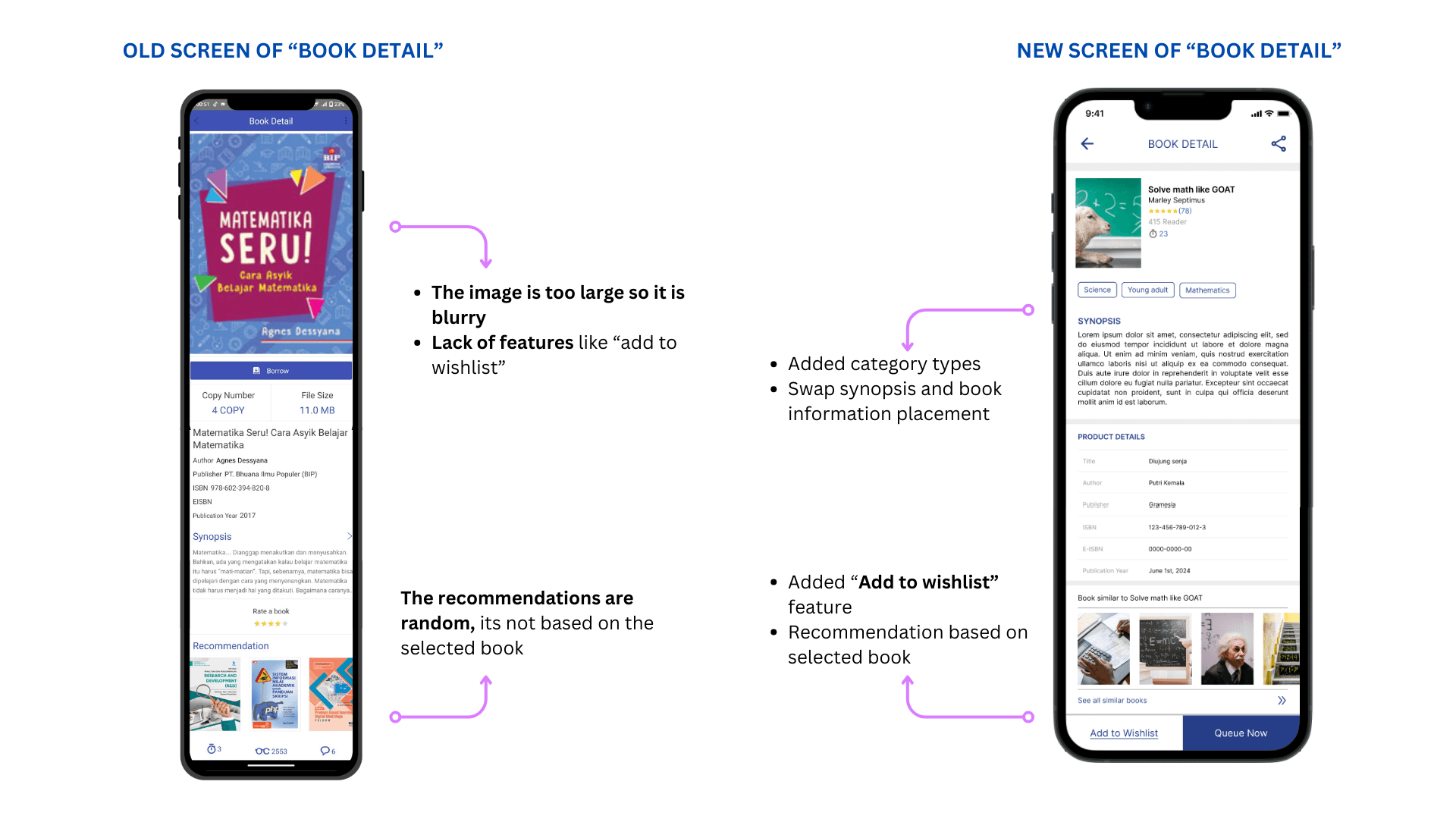
Book Image - Before the redesign, the book image was very large, filling the mobile screen, which also caused the image to become blurry. So I adjusted it to a more ideal size.
Add to Wishlist - This is an existing feature, but I proposed to use it more efficiently. Before the redesign, users could add books they wanted to read to their wishlist by clicking "Queue". I separated the queue list and wishlist to make it easier for users to manage their books.
Book Information - I placed the main information (title, author, rating, and number of reads) at the top because this information is the most important for users, while other information such as ISBN was moved below the synopsis.
Book Recommendation - Book recommendations are now displayed based on the selected book, making it easier for users to find similar books.
Proposed Solution
Book Image - Before the redesign, the book image was very large, filling the mobile screen, which also caused the image to become blurry. So I adjusted it to a more ideal size.
Add to Wishlist - This is an existing feature, but I proposed to use it more efficiently. Before the redesign, users could add books they wanted to read to their wishlist by clicking "Queue". I separated the queue list and wishlist to make it easier for users to manage their books.
Book Information - I placed the main information (title, author, rating, and number of reads) at the top because this information is the most important for users, while other information such as ISBN was moved below the synopsis.
Book Recommendation - Book recommendations are now displayed based on the selected book, making it easier for users to find similar books.
Proposed Solution
Book Image - Before the redesign, the book image was very large, filling the mobile screen, which also caused the image to become blurry. So I adjusted it to a more ideal size.
Add to Wishlist - This is an existing feature, but I proposed to use it more efficiently. Before the redesign, users could add books they wanted to read to their wishlist by clicking "Queue". I separated the queue list and wishlist to make it easier for users to manage their books.
Book Information - I placed the main information (title, author, rating, and number of reads) at the top because this information is the most important for users, while other information such as ISBN was moved below the synopsis.
Book Recommendation - Book recommendations are now displayed based on the selected book, making it easier for users to find similar books.
Addressing "Reading Page" Screen
Addressing "Reading Page" Screen
Addressing "Reading Page" Screen
Proposed Solution
Adjust Font Size - Comfortable reading is the primary goal of an online library application. Font size customization is a feature that enhances the online reading experience, which unfortunately is missing in the iPusnas app. I recommend adding this feature to improve user satisfaction.
Viewing Themes - In the previous design, there were only two theme options: black and white. I propose adding a popular and well-liked reading theme called “sand.” This theme has moderate contrast, making it easier on the eyes for prolonged screen viewing. While black and white themes offer maximum color contrast, the sand theme strikes a balance between readability and comfort.
Table of Contents - Separating the table of contents from annotations is beneficial because these two features serve different purposes. By keeping them separate, users can navigate more efficiently.
Annotations - I’ve added a new feature within annotations called “notes.” Although the iPusnas app already has a note feature, it was previously located in the user profile sidebar, distant from the reading page. By integrating notes directly into the reading page, users can conveniently save their thoughts while reading a book.
Bookmark and Highlight - I recommend revisiting the implementation of these two essential features. Both bookmarks and highlights play crucial roles in reading apps, but in iPusnas, they are not yet optimized.
Proposed Solution
Adjust Font Size - Comfortable reading is the primary goal of an online library application. Font size customization is a feature that enhances the online reading experience, which unfortunately is missing in the iPusnas app. I recommend adding this feature to improve user satisfaction.
Viewing Themes - In the previous design, there were only two theme options: black and white. I propose adding a popular and well-liked reading theme called “sand.” This theme has moderate contrast, making it easier on the eyes for prolonged screen viewing. While black and white themes offer maximum color contrast, the sand theme strikes a balance between readability and comfort.
Table of Contents - Separating the table of contents from annotations is beneficial because these two features serve different purposes. By keeping them separate, users can navigate more efficiently.
Annotations - I’ve added a new feature within annotations called “notes.” Although the iPusnas app already has a note feature, it was previously located in the user profile sidebar, distant from the reading page. By integrating notes directly into the reading page, users can conveniently save their thoughts while reading a book.
Bookmark and Highlight - I recommend revisiting the implementation of these two essential features. Both bookmarks and highlights play crucial roles in reading apps, but in iPusnas, they are not yet optimized.
Proposed Solution
Adjust Font Size - Comfortable reading is the primary goal of an online library application. Font size customization is a feature that enhances the online reading experience, which unfortunately is missing in the iPusnas app. I recommend adding this feature to improve user satisfaction.
Viewing Themes - In the previous design, there were only two theme options: black and white. I propose adding a popular and well-liked reading theme called “sand.” This theme has moderate contrast, making it easier on the eyes for prolonged screen viewing. While black and white themes offer maximum color contrast, the sand theme strikes a balance between readability and comfort.
Table of Contents - Separating the table of contents from annotations is beneficial because these two features serve different purposes. By keeping them separate, users can navigate more efficiently.
Annotations - I’ve added a new feature within annotations called “notes.” Although the iPusnas app already has a note feature, it was previously located in the user profile sidebar, distant from the reading page. By integrating notes directly into the reading page, users can conveniently save their thoughts while reading a book.
Bookmark and Highlight - I recommend revisiting the implementation of these two essential features. Both bookmarks and highlights play crucial roles in reading apps, but in iPusnas, they are not yet optimized.
LESSON LEARNED
LESSON LEARNED
LESSON LEARNED
After working on this project, I have learned more about addressing existing issues. I understand that implementing UI/UX principles more effectively can significantly impact the overall interface and user experience of an application
After working on this project, I have learned more about addressing existing issues. I understand that implementing UI/UX principles more effectively can significantly impact the overall interface and user experience of an application
After working on this project, I have learned more about addressing existing issues. I understand that implementing UI/UX principles more effectively can significantly impact the overall interface and user experience of an application
Previous Page
Previous Page
Previous Page
iPusnas | Page 2 of 2
iPusnas | Page 2 of 2
iPusnas | Page 2 of 2